


Vehicles
First up is a picture on how to aim in an "Ostwind. Click on the picture for a larger size. Pretty much self explanatory.
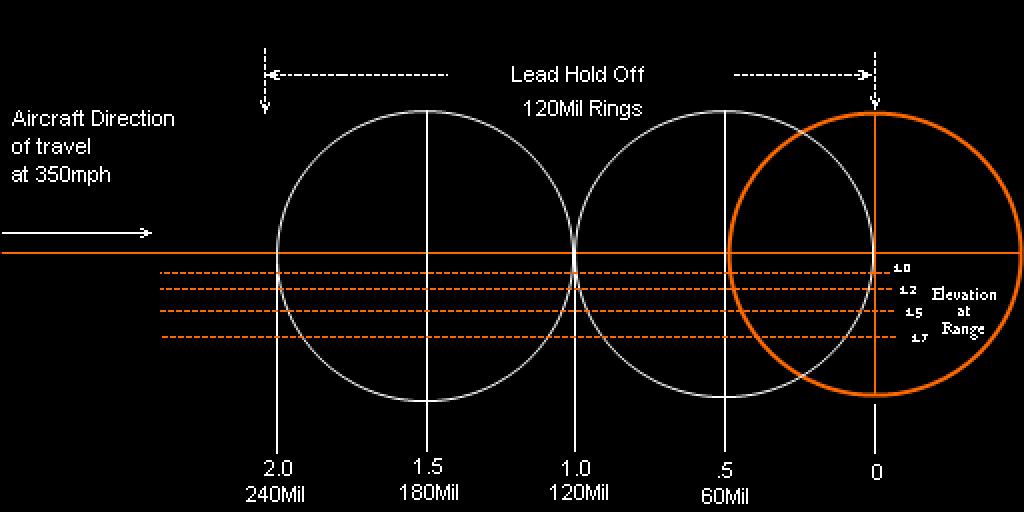
Aiming In an Ostwind
Ok, here it is, by popular demand, the key, the secret, the way to consistantly kill at high deflection in an Ostwind by "Zazen". He post this for one reason and one reason only. To make vulching, which is just spawn camping planes with planes, as unpleasant an experience as possible and totally non-viable as a method to pad fighter scores.
Firstly, there's a couple of things to note, always park your Ostwind on concrete somewhere. Secondly, always have your clipboard open and your mouse cursor on the Tower button so you can end mission quickly if you hear ordnance about to plop on your head. Thirdly, learn where to park your Ostwind, in AH2 there's two main places to park it, near the Fighter Hangers, but not too near and near the tower on a small field or near the nexus of runways at a medium or large field for vulcher slaying. In some situations you may not want to park at all, such as when there are no friendly aircraft to amuse the vulchers, in this situation go up and down the runways in 5th gear maintaining a straight line path to make compensating for your own movement as easy as possible.
As far as aiming goes, the core principle is rather simple, some may have already heard me state it. Always fire fully zoomed in. While fully zoomed in a target travelling roughly parallel or perpendicular to the ground at a range of 1k will be hit if kept exactly at the edge of your screen. Therefore a target 500 away should be kept halfway from the edge of your screen to your crosshair. This is the basis for all shots. Now shots off angle you must judge by the aircraft's attitude, speed and size as to how much extra or less to lead it relative to the base amount, always leading in the direction of the target plane's nose. Always lead your target slightly more than you think you should and slightly above to allow for shell drop, and keep your turret swivel motion as smooth and fluid as possible. On large targets and slower than average targets lead a little less, on small and fast targets lead a little more.
Another thing to realize, while an Ostwind shell can technically kill at distances approaching 3k, never ever fire over 1.5k for one simple reason. The smoothing code or whatever, does an adjustment at 1.5k, you will notice a small burp or hiccup in the planes position, so at distances over 1.5k you are not actually seeing the plane where it really is. You'll notice this effect on bombers, it is espeically pronounced with the drones in a formation. I almost never shoot beyond 1.2k on anything that isn't just coming directly at or away from me. The 1k distance is really where you want to be firing, it's the key to accurate deflection shooting in the Ostwind.
To sum this up really simply:
1k away = target at the edge of your visible screen.
750 away = target is 3/4s of the distance from crosshair to edge.
500 away = halfway from your crosshair to the edge of screen.
250 = 1/4 the distance from your crosshair to the edge.
This only works if you are Fully Zoomed in! (of course you do your scanning un-zoomed) I also recommend being fully Page-Up'd by default.
Hope this helps! Death to vulchers!
Control Settings
Control settings are very personal, but here are my recommendations.
Joystick vs mouse for gun movement. I use the joystick Up, down, left, and right are all very intuitive to me. The mouse moves quicker, but your still limited by the guns ability to move. If its a slow traversing gun getting your "pointer" to the target fast doesnt help if you cant shoot until the gun gets there.
Movement: I like to use a "hat" on my throttle. Up and down is to jump from position 1 to 2. Forward and backward are to run the vehicle forward and backward. I use my pedals to turn left and right.
For me this enough. Others use all the positions for guns and views and so use more buttons. I have some old screen shots (actually photos of a screen) one player posted years ago on how he set up his Saitek X52 for GVing. If you would like them, "Click Here".
Ground Vehicle Ranging/Aiming
How to use the GV site
Zheriz Ziess Sight Guide is a pdf file that explains how the German tank sites are used. What the "triangles" mean and how to use them to range other tanks. It is a bit hard to understand on the first read through ( took me a dozen of so to figure it out), but don't give up. This is the core of learning to range targets in the game.
Ranging Charts
Next are aiming/ranging aids I have found. Jason "Bud Grey" Bennett put these together years ago and are a great way to learn what ranges look like when in the gun site.
The first is a Pnz site chart. You ID the tank your looking at, see how many "mils" the tank takes up in your site, then use the chart to see how far the tank is away.
The second is Tank Refence sheet. It gives you details on each tank.
The last is a damage chart of what each round in AH does for damage.
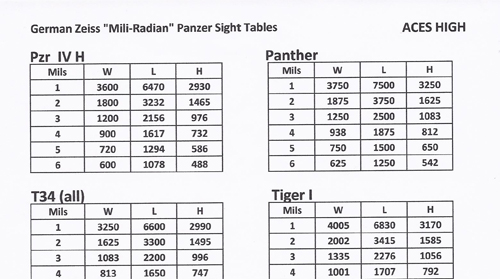
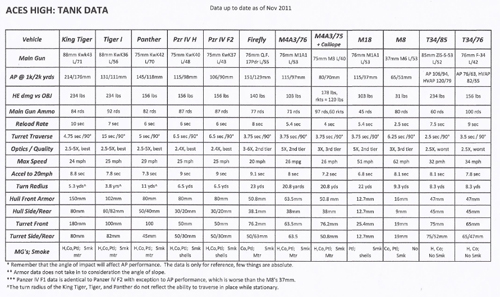
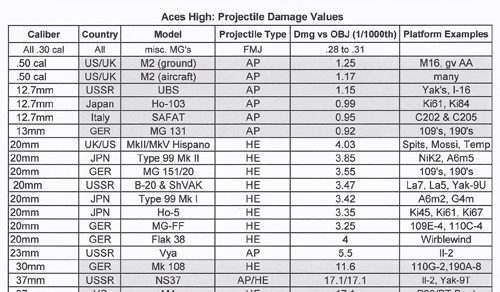
Here is another range chart, this one from "Kenai" His gives the site measurement in "mils" and the left column gives you an approximate range.
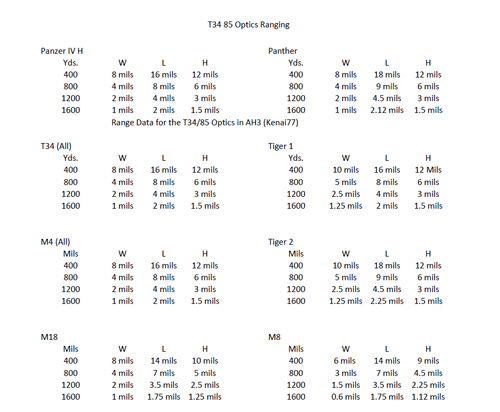
Click on any of the above pictures to
get a "pdf" with all the information of each.
Basic GV information
Basic Tanking 101 is a write-up by Cjpedrido. Its a basic info page going over, well the basics of GVing in Aces High.
GV Training, Tips, and Tricks. We had a discussion on the Aces High message boards about GVing. I asked questions and got a lot of answers starting with 8thJinx, and many more with tips and tricks.
Basic Tanking 101 is a write-up by Cjpedrido. Its a basic info page going over, well the basics of GVing in Aces High.
GV Training, Tips, and Tricks. We had a discussion on the Aces High message boards about GVing. I asked questions and got a lot of answers starting with 8thJinx, and many more with tips and tricks.